
Hardware Wallet vs Software Wallet: Which Crypto Storage
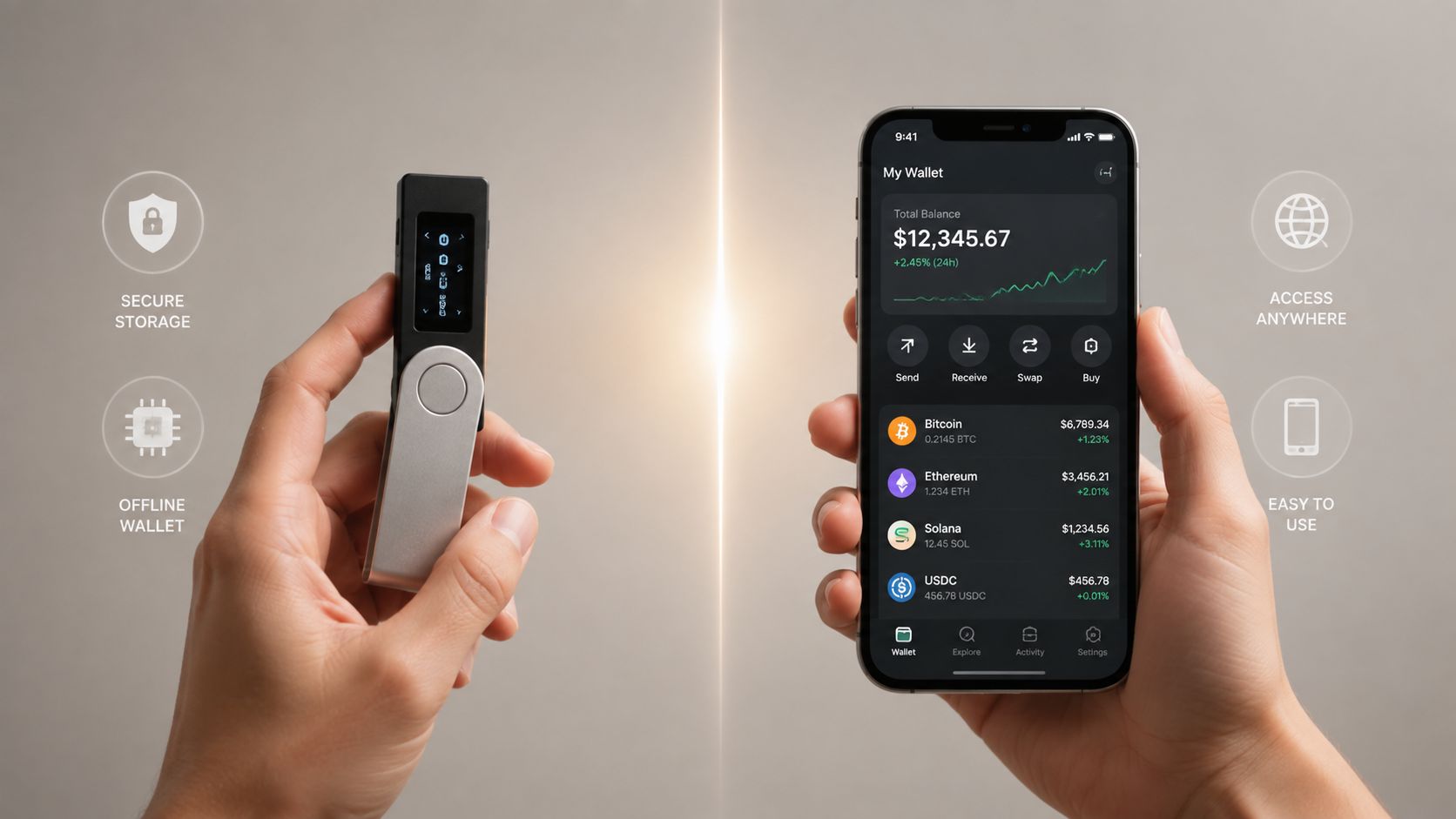
The most popular advice in crypto is also the most incomplete: buy a hardware wallet and your funds are safe. Offline key storage is a major security improvement, but it doesn't protect you from approving a malicious smart contract, entering your seed phrase into a fake support page, or confirming the wrong address on a compromised screen.
The useful question isn't hardware wallet vs software wallet. It's, which attack paths are you exposed to, and how will you control them? A hardware wallet can isolate private keys from malware. A software wallet can make Bitcoin payments, Ethereum transactions, Layer 2 activity, NFT transfers, and DeFi interactions far easier. Neither device can rescue a user who gives away the recovery phrase.
| Factor | Hardware wallet | Software wallet |
|---|---|---|
| Key location | Dedicated device, isolated from the internet | Phone, computer, or browser environment |
| Transaction signing | On-device confirmation and signing | Signing inside or through a connected device |
| Best use | Long-term holdings and larger balances | Frequent transactions and active Web3 use |
| Main advantage | Stronger protection from malware and keyloggers | Speed, accessibility, and low friction |
| Main weakness | Physical access, fake devices, and approval mistakes | Larger online attack surface |
| Seed phrase risk | Still absolute, whoever has it can recover the wallet | Still absolute, whoever has it can recover the wallet |
Table of Contents
- Why the Offline Equals Safe Myth Fails
- How Hardware and Software Wallets Actually Work
- Security Threats and Real-World Attack Scenarios
- Seed Phrase Management and Recovery Strategies
- Daily Usage Patterns and Practical Trade-Offs
- Setting Up a Hybrid Wallet Strategy
- Choosing the Right Wallet for Your Situation
Why the Offline Equals Safe Myth Fails
A hardware wallet is safer against some attacks, not all attacks. That distinction matters because crypto theft usually follows a chain of user interaction, deception, and authorization rather than a cinematic remote break-in.
Phishing is the clearest example. A fake wallet website can ask for a recovery phrase. A counterfeit support account can pressure a user to “verify” an account. A malicious browser extension can present a legitimate-looking transaction while redirecting funds. The device type doesn't matter if the user voluntarily exposes the master credential.
The same applies to malicious approvals. A wallet can display a transaction for an Ethereum application, a DeFi protocol, an NFT marketplace, or a Layer 2 bridge. If the user approves a dangerous token allowance or signs an unfamiliar message, the hardware wallet has performed its job correctly. It protected the key while the owner authorized a harmful action.
The real security boundary is the moment you approve a transaction, not the moment you plug in a device.
This broader view resembles the way good security education challenges simplistic technology claims. The HIPAA-compliant myth busting guide is useful context because it shows why familiar security slogans often hide the conditions that make them true or false.
A cold wallet still has an important role. A cold wallet explained for self-custody keeps the private key away from an internet-connected device, reducing exposure to malware, keyloggers, and remote compromise. That protection is real. It just isn't a complete custody system.
The scale of adoption explains the debate. A 2025 Security.org survey found that roughly 30% of American adults, or 70.4 million people, owned cryptocurrency, compared with 27% in 2024, and its summary described hardware wallets as the strongest long-term holding option because they keep private keys offline. Security.org's cryptocurrency consumer report provides that context.
The practical conclusion is blunt. Buy hardware for key isolation, but build your habits around phishing resistance, approval hygiene, address verification, and seed protection. Offline storage removes one class of attack. It doesn't remove the person holding the wallet from the attack surface.
How Hardware and Software Wallets Actually Work
A wallet doesn't store Bitcoin, Ether, or an NFT inside the device. The assets remain recorded on their respective blockchains. The wallet stores, or provides access to, the cryptographic keys that authorize changes to those records.
A hardware wallet generates and protects private keys inside a dedicated device. The signing key stays inside the secure hardware and doesn't leave it. When you initiate a transaction from an app, the connected computer or phone prepares the transaction data, the hardware wallet displays important details on its trusted screen, and the device signs internally after confirmation.
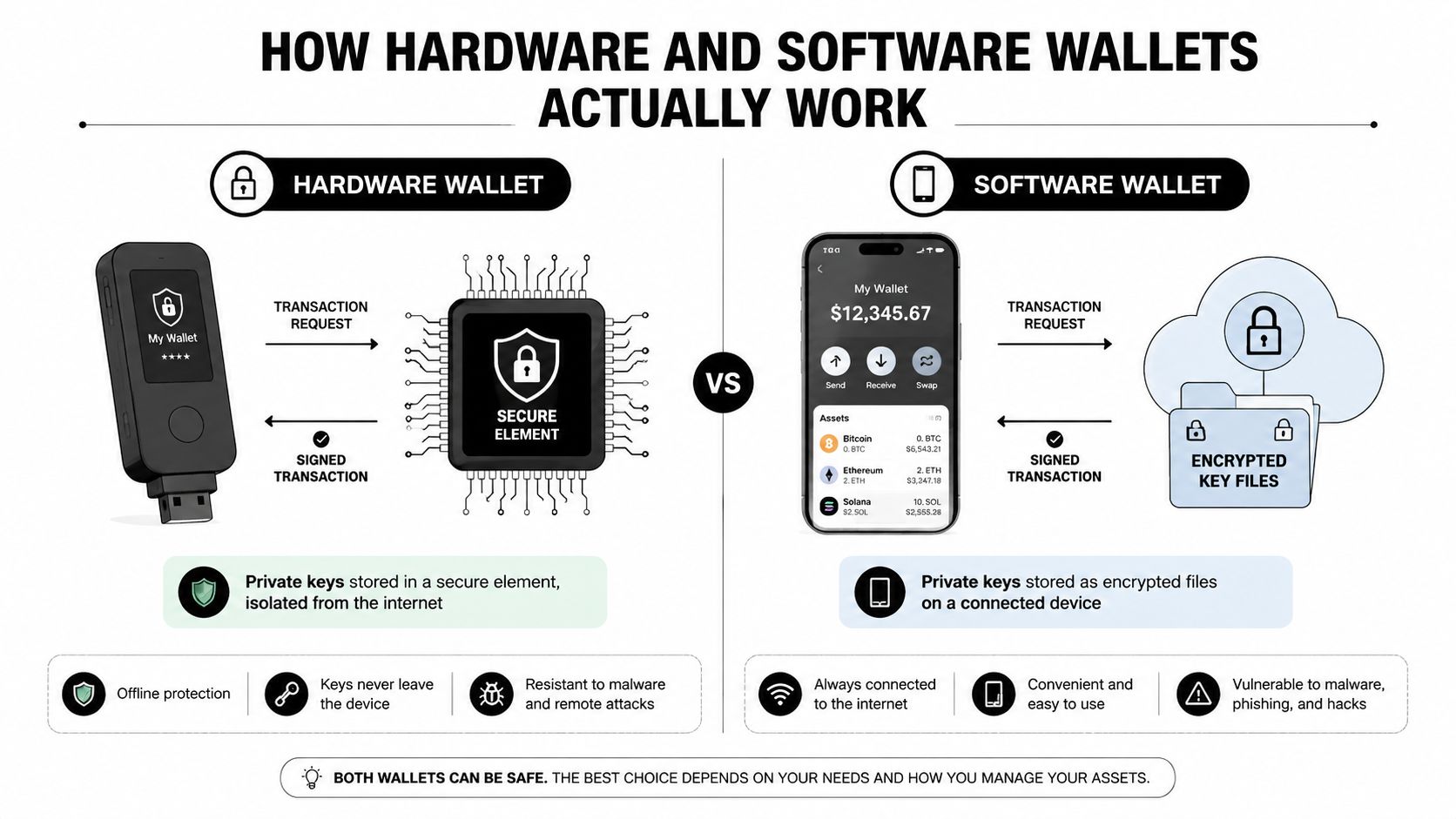
The connected app then broadcasts the signed transaction. It can see the address, balance, and signed output, but it shouldn't receive the private key itself. This separation sharply reduces the chance that malware or a keylogger on the host computer can extract the signing secret.
A software wallet stores key material in an application or encrypted wallet file on a general-purpose device. That may be a mobile phone, desktop computer, or browser extension. The wallet can be convenient because it lives where the user already works, but the operating system, browser, extensions, downloads, clipboard, and notifications all become part of the surrounding attack surface.
The signing difference
The key distinction isn't that one wallet connects to a blockchain and the other doesn't. Both rely on connected software to communicate with networks. The distinction is where the private key performs the signature operation.
With a software wallet, the signing environment shares a device with many other applications. With a hardware wallet, the signing operation takes place inside a purpose-built device, and the user confirms the transaction on a separate screen. That screen matters because a compromised computer can alter transaction details before they reach the wallet.
This protection has limits. If the user ignores the hardware screen, or accepts an unfamiliar contract interaction without understanding it, isolation won't prevent loss. The device can prove that the user authorized a transaction, but it can't determine whether the user understood the transaction.
Why dApps complicate the picture
Web3 applications add another layer. A DeFi interface may request token permissions. An NFT marketplace may ask for a signature. A game may interact with a smart contract across a mainnet or Layer 2 network. Hardware wallets can protect the key during these actions, but the user still needs to inspect the destination, network, amount, contract, and requested permission.
That architecture makes the choice less ideological. Software wallets are practical interfaces for active blockchain use. Hardware wallets are stronger signing vaults for assets that don't need constant movement.
Security Threats and Real-World Attack Scenarios
Security becomes clearer when you examine what the attacker needs. Different attacks target different points in the transaction process, and hardware wallets only block some of them.
Malware and keyloggers are where hardware devices have the cleanest advantage. A software wallet keeps key material on a general-purpose online device, so malware may attempt to capture passwords, alter clipboard addresses, or access wallet files. A hardware wallet keeps the signing key inside dedicated hardware, which sharply reduces the value of a compromised laptop or phone.
Phishing is different. A fake wallet interface can target either user. Hardware wallet owners have been targeted by spoofed interfaces that wait for a connected device and then display fake recovery-phrase prompts. Security coverage of recovery-phrase phishing malware illustrates why “I use a hardware wallet” isn't a defense against social engineering.
Counterfeit devices create a supply-chain risk. A fake or tampered wallet may expose keys during setup, especially when purchased through an unofficial marketplace. Verify device authenticity through the manufacturer's official process, use official software, and reject any setup flow that presents a pre-generated recovery phrase.
Approval attacks bypass the headline feature
A smart contract approval can be dangerous even when the private key remains perfectly isolated. The user signs the authorization, and the contract later uses that permission according to its code or the attacker's design. This is particularly relevant for active DeFi users, NFT collectors, and crypto gamers who connect wallets to many unfamiliar applications.
A hardware wallet gives you a trusted screen and a deliberate confirmation step. It doesn't automatically translate complex contract calls into plain English, and it doesn't guarantee that every displayed interaction is safe. Users still need to revoke unnecessary allowances, limit exposure in experimental applications, and separate valuable holdings from activity wallets.
The broader breach-prevention lesson is useful here. A practical data breach prevention guide from Reworx Recycling reinforces the importance of reducing access, controlling sensitive information, and treating the surrounding system as part of the security problem.
Loss data tells a nuanced story
Infrastructure attacks tied to private keys, seed phrases, wallet infrastructure, and front-end surfaces caused $2.2 billion in losses across 45 incidents in 2025, according to the coverage summarized in the hardware and software wallet security analysis. That figure doesn't mean every hardware wallet is unsafe. It shows that custody failures occur across several layers, including interfaces and user decisions.
Phishing and drainer losses also changed. They fell to about $83.85 million in 2025 from nearly $494 million in 2024, according to the market commentary in this hardware wallet guide. The threat declined, but active signing remains risky. Users who interact frequently need transaction discipline, not just cold storage.
For broader phishing hygiene, the guide to avoiding phishing attacks belongs in every self-custody checklist.
Seed Phrase Management and Recovery Strategies
The seed phrase is the actual wallet. The physical device is only one way to use it.
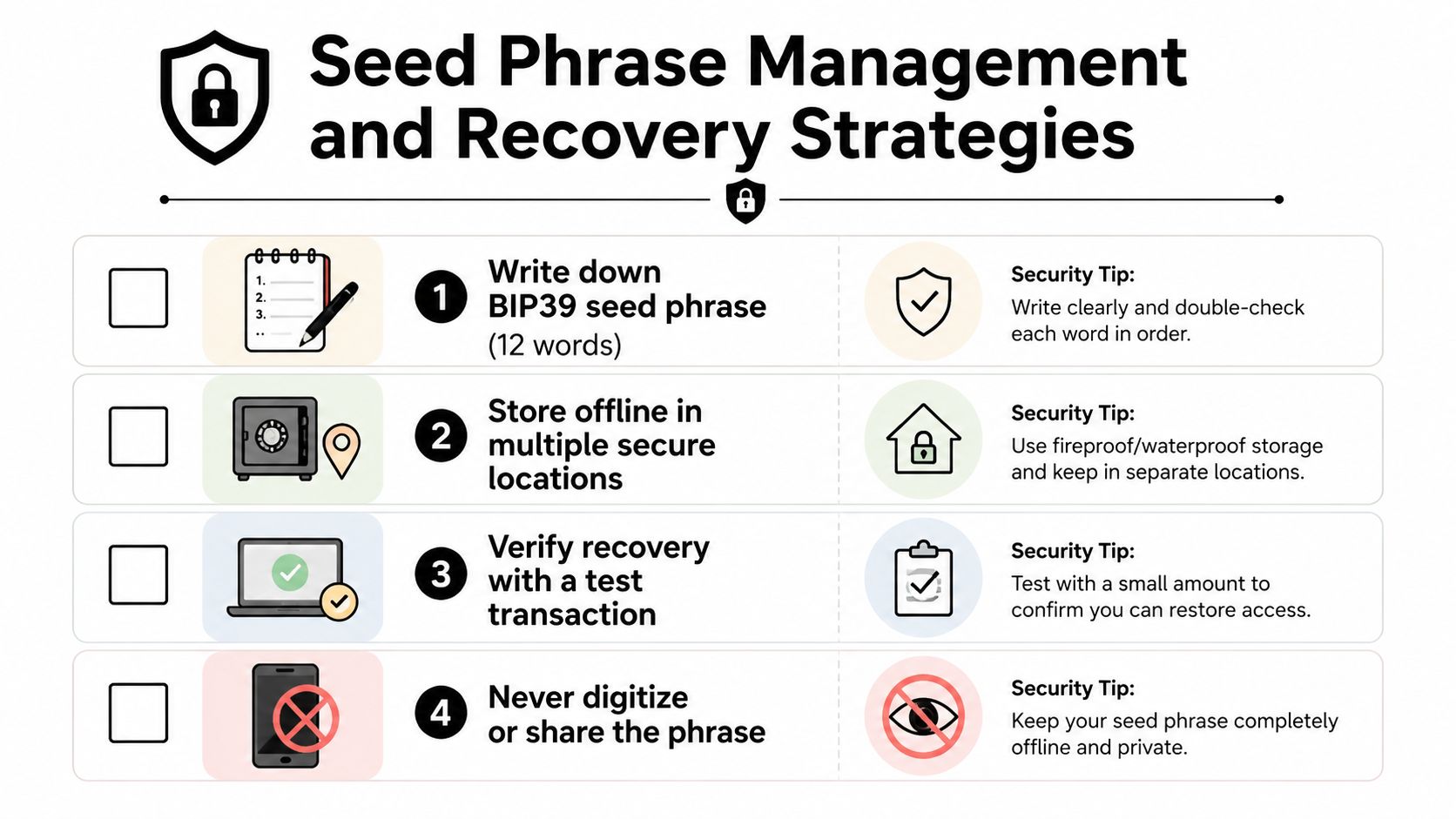
Under the BIP39 standard, a seed phrase typically consists of 12 or 24 English words. It acts as the master backup from which wallet private keys are deterministically derived. One phrase can generate an unlimited number of key pairs through different derivation paths, which is why a phrase can restore accounts across multiple compatible applications and devices.
That portability is useful during recovery, but it creates a total-failure credential. Anyone who obtains the phrase can restore the wallet elsewhere. Losing the device may be inconvenient. Losing control of the phrase is catastrophic.
Keep the backup offline
Don't photograph the phrase. Don't put it in cloud notes, email, password managers, messaging apps, or an encrypted file on a computer connected to the internet. Digital storage creates additional copies that attackers can target.
Write the words in the correct order on paper or a durable metal backup. Store copies in separate secure locations, such as a safe or safety deposit box, so a single fire, flood, theft, or mistake doesn't destroy every recovery path. Seed phrase storage guidance from Ledger supports this offline approach.
Use the phrase only when you have a clear recovery need. Legitimate wallet providers won't ask you to submit it online. Support agents don't need it, decentralized applications don't need it, and no “security check” should require it.
If a website asks for your seed phrase, close the page. The request itself is the attack.
Before transferring meaningful assets, test the recovery process with a separate compatible environment and confirm that the expected addresses appear. A test recovery should happen privately and deliberately, not during an emergency.
The seed phrase storage guide offers a useful practical reference for reviewing physical backups, access controls, and recovery planning.
Recovery isn't the same as transaction safety
A correctly stored seed protects access after a device is lost or destroyed. It doesn't protect against a malicious approval that was already signed. That's why seed management, phishing resistance, and approval hygiene belong in one operating system for self-custody.
Watch the recovery process on a trusted screen, verify addresses before sending, and keep high-value holdings away from experimental dApps. If you use several wallet types, give each wallet a distinct recovery phrase rather than importing the same phrase everywhere.
A short visual walkthrough can reinforce the setup process:
Daily Usage Patterns and Practical Trade-Offs
The best wallet is the one you can use correctly under pressure. Hardware isolation helps only when you still read the signing request, reject malicious approvals, and keep the seed phrase private. Excessive friction can push funds into an exposed account, defeating the protection you bought.
An active Ethereum DeFi user may move between a decentralized exchange, lending protocol, staking interface, and Layer 2 bridge in one session. A browser extension software wallet makes those connections fast. A hardware wallet adds a physical confirmation step for each signature, but the user must identify whether the prompt requests a transfer, token approval, or complex smart contract interaction. A hardware screen does not make a malicious approval legitimate.
Separate activity from reserves. Keep only the amount needed for current experimentation and trading in the software wallet. Store assets that do not need constant signing in the hardware wallet. This limits losses if phishing captures credentials, a dApp requests an unsafe approval, or a contract interaction behaves maliciously.
NFT collectors face the same trade-off. Fast minting can matter when a collection uses a new contract or limited window. Speed should not justify connecting a wallet that contains long-term Bitcoin, Ether, or valuable NFTs to every marketplace and minting site. Use a smaller activity wallet for unfamiliar contracts, and revoke approvals you no longer need.
What adoption reveals
The market favors convenience. An industry summary reported approximately 820 million active crypto wallets globally, with 78% classified as hot and 22% as cold, while hardware wallet shipments reached 5.8 million units in 2024. As reported in the Security.org consumer report cited above, those figures reflect the separate roles of online access and long-term offline storage.
A separate 2025 adoption summary reported about 520 million software wallet downloads globally. It identified phishing and malware as the main risks associated with online exposure, while estimating that only about 2% to 3% of global crypto users relied on hardware wallets as their primary storage solution in 2025. The same summary reported 31% hardware wallet sales growth that year and projected hardware-wallet market growth at a CAGR near 30%. The 2025 wallet adoption summary contains those figures.
These figures describe behavior, not a security verdict. Software wallets dominate because users need speed. Hardware wallets suit people willing to accept slower signing for stronger key isolation, provided they verify what they approve.
A usability warning
Wallet complexity causes mistakes. In a 60-person task-based evaluation, users struggled with installation and network-privacy setup, and only about one quarter completed a real-world purchase using the wallet, as documented in the cryptocurrency wallet usability study.
Learn the signing flow with small amounts. Avoid rushing during high-demand mints. Familiar interfaces do not replace address checks, approval review, or attention to the contract being signed.
Setting Up a Hybrid Wallet Strategy
A hybrid strategy is the strongest practical answer for most active users. It treats wallets like different financial tools, not competing religions.
Build three separate roles
Daily wallet: Use a software wallet for routine payments, small trades, NFT activity, gaming tokens, and dApp experiments. Keep its balance limited to what you can afford to expose to frequent approvals.
Reserve wallet: Use a hardware wallet for long-term Bitcoin, Ethereum, and other holdings that don't need constant movement. Connect it only when you have a specific transaction to review and sign.
Recovery layer: Keep the recovery phrase offline and separate from the device. A spare compatible device can support emergency recovery, but it must not become another casually connected wallet.
The exact balance between these tiers depends on your circumstances. Don't copy an allocation percentage from a graphic or an influencer. Set a loss limit for the activity wallet, then maintain it deliberately.
Move funds carefully
Start by purchasing a hardware wallet through an official channel and initialize it yourself. Never use a device that arrives with a recovery phrase already printed or supplied. Confirm the receiving address on the hardware device's own screen before sending funds from an exchange or software wallet.
Send a small test transfer first. After the address and network are confirmed, move the remaining balance in a separate transaction. For Ethereum, check that you're using the intended network, especially when moving between mainnet and Layer 2 systems. For Bitcoin, verify the address format and destination directly on the trusted device.
Keep the reserve wallet out of routine dApp connections where possible. If you must use it for a particular protocol, inspect the contract, review requested permissions, and disconnect afterward. A hardware wallet should not become a permanent signing accessory for every new Web3 application.
Establish operating rules
Write down the rules before a stressful market move:
- No seed entry online: Never type the recovery phrase into a website, computer, or phone.
- No blind signing: Don't approve a transaction you can't identify.
- No shared seed: Don't import a hardware wallet's phrase into a hot wallet.
- No unlimited exposure: Keep experimental activity separate from reserves.
- No rushed transfers: Confirm network, address, asset, and amount on the trusted screen.
This setup creates friction where the potential loss is high and removes friction where the amounts are deliberately limited.
Choosing the Right Wallet for Your Situation
There isn't one universal winner in the hardware wallet vs software wallet debate. My recommendation is straightforward: use a hardware wallet for assets you intend to keep, and a software wallet for activity you intend to perform. Treat that as a custody design principle, not a rigid rule.
A long-term Bitcoin holder should choose hardware first. The same applies to an Ethereum holder who doesn't need to interact with DeFi every day. Offline key isolation reduces the exposure created by a general-purpose computer, and the trusted screen adds a meaningful verification step.
An active DeFi user should use both. The software wallet handles routine interactions, while the hardware wallet protects reserves. Keep the software balance intentionally limited, and don't connect the reserve to every protocol, NFT mint, game, or bridge.
A newcomer should begin with a software wallet only if the balance is small enough to serve as tuition. Learn seed backups, address checks, network selection, and transaction signing before moving meaningful holdings into self-custody. Once the value or responsibility feels significant, upgrade the reserve to hardware.
| User Profile | Primary Wallet | Secondary Wallet | Key Priority |
|---|---|---|---|
| Long-term holder | Hardware wallet | Minimal software wallet | Offline key isolation |
| Active DeFi participant | Software wallet for activity | Hardware wallet for reserves | Approval hygiene and balance limits |
| NFT collector or crypto gamer | Software wallet for routine interactions | Hardware wallet for valuable assets | Separate experimental contracts from reserves |
| Newcomer learning self-custody | Software wallet with limited funds | Hardware wallet as skills develop | Seed phrase discipline and transaction verification |
| High-value self-custody user | Hardware wallet | Separate recovery device or controlled backup | Recovery planning and physical security |
Don't wait for a dramatic portfolio milestone before improving custody. Upgrade when your holdings, transaction frequency, or use of unfamiliar smart contracts makes a single hot wallet uncomfortable. The price of a device is only one consideration. The larger cost is operational: you must protect the device, verify transactions, maintain backups, and resist social engineering.
Hardware wallets are better vaults. Software wallets are better tools for movement. Your behavior decides whether either one protects you.
Read Coiner Blog for practical cryptocurrency guides and analysis covering Bitcoin, Ethereum, DeFi, Web3, NFTs, crypto gaming, Layer 2 networks, tokenomics, AI and crypto, and real-world asset tokenization. Visit Coiner Blog to sharpen your self-custody habits and make better-informed decisions as the blockchain ecosystem changes.