
Samsung Blockchain Keystore Explained for 2026
You're in Settings on a Galaxy phone, scrolling past a feature you didn't install and didn't ask for, and the name alone makes you pause. Blockchain Keystore sounds important, maybe even risky, but the screen gives you almost no context. If you've ever wondered whether this is a hidden wallet, a security tool, or just Samsung jargon, that confusion is normal.
The cleanest way to think about Samsung Blockchain Keystore is as a hardware-backed signing layer inside supported Galaxy phones. It was launched in early 2019 with the Galaxy S10 series, and Samsung positioned it to store a user's private key in the phone's secure area and sign blockchain transactions in a safe environment.Samsung Blockchain Keystore introduction It's not a standalone exchange account, and it's not just a wallet app sitting on top of Android. It's closer to a locked room in the phone that handles key storage, authentication, and signing while keeping the main operating system out.
That distinction matters because a lot of crypto users still mix up where keys live with where apps are used. A hot wallet on your phone can be convenient, but the key often lives closer to the general app layer. Samsung's approach pushes that sensitive part deeper into device security, which changes the threat model in a real way.
Table of Contents
- What Samsung Blockchain Keystore Actually Is
- How the Security Architecture Works
- Creating a Wallet and Backing Up the Recovery Phrase
- How It Compares to Hot Wallets and Hardware Wallets
- Using the Keystore With dApps and Supported Networks
- Risks, Limits, and Common Problems
- Best Practices for Long-Term Key Management
What Samsung Blockchain Keystore Actually Is
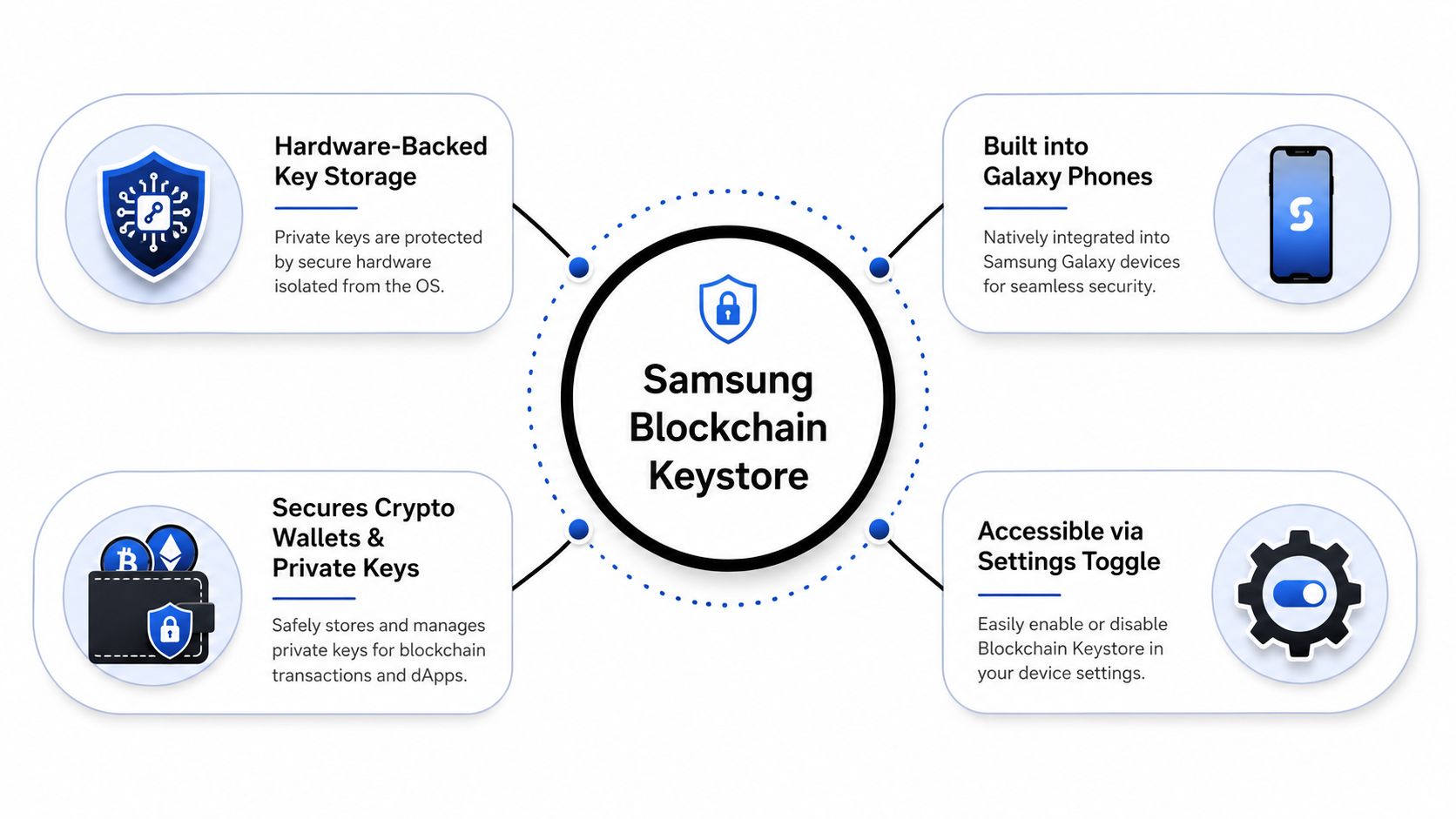
The first time many people notice Samsung Blockchain Keystore is when they find a toggle buried in Settings and wonder whether it should be touched. That reaction makes sense, because the feature does not behave like a normal app you install from a store. It is built into supported Samsung devices, and Samsung says it was initially offered as a preloaded feature on selected devices in selected countries.Samsung Blockchain Keystore introduction
A built-in signing layer, not just a wallet
The cleanest way to frame it is simple. A wallet app shows balances and sends transactions. Samsung Blockchain Keystore sits underneath that workflow as a device-level signing layer, with key management, transaction signing, and authentication through PIN or fingerprint.Samsung key management Samsung also describes it as supporting blockchain transaction signing in a safe environment, which signals that the feature was designed to do more than hold a private key and stay idle.Samsung Blockchain Keystore introduction
That design choice matters in everyday crypto use. If you interact with Bitcoin tools, Ethereum dApps, or DeFi apps on a phone, the signing step is where risk concentrates. Samsung moved that step into hardware-backed phone security instead of leaving it entirely to third-party apps or browser extensions.
Practical rule: Treat the Keystore as the part that approves and signs, not as a place where your whole crypto identity magically lives in the cloud.
Who gets it
Availability varies by region and model, and not every Galaxy phone includes it. Samsung tied the debut to the flagship Galaxy S10 family, which made the feature feel mainstream from day one because it arrived on a premium handset line distributed globally.Samsung Blockchain Keystore introduction
That context matters, because it is easy to assume every Samsung phone ships with the same blockchain tools. It does not. If your device does not show the option in Settings, the feature may not be available on that model or in your market.
For a broader primer on what a private key is, this private key explainer helps explain why Samsung built around secure key handling in the first place. Once you understand that one key can control the assets, the product looks less like a gimmick and more like a security boundary. That framing also matches the old crypto warning that you are not your keys, not your coin, which is why the device's job is to protect the key, not to replace good custody habits.
How the Security Architecture Works
A useful way to read Samsung Blockchain Keystore is to treat it like a signing room inside the phone. Android handles the ordinary traffic outside, while the Trusted Execution Environment, or TEE, keeps the sensitive work behind a separate boundary. Ordinary apps do not get direct access to that space, which matters once a private key is involved.
TEE, Trusted Applications, and Trusted User Interface
Samsung says Blockchain Keystore is built around ARM TrustZone, the Trusted Execution Environment (TEE), and Trusted Applications (TAs) that handle high-risk tasks such as root-seed generation, transaction parsing, and blockchain transaction signing inside that protected boundary.Samsung Blockchain Keystore architecture The practical meaning is straightforward. The parts that decide and sign do not sit in the same space as normal apps, so a malicious app has a harder time reaching them.
The same architecture also includes a Trusted User Interface (TUI) in the TEE. That is the protected path for confirmation, PIN entry, and fingerprint-related approval, so those actions are handled away from a screen layer that a fake overlay could imitate.Samsung Blockchain Keystore architecture If you have ever seen a phishing prompt that looks almost right, this is the threat model Samsung is trying to reduce.
The boundary is the point. Android should not read the private key or the recovery seed, and signing should happen only after user authentication.
Samsung's overview says the private key and related information stay isolated within Samsung Knox TrustZone and a defense-grade TEE, are never saved to Samsung or external cloud storage, and are not visible to Android OS.Samsung overview That does not make the phone invulnerable. It does mean malware that lives in the main OS has a harder job, because it is attacking the shell rather than the vault itself.
Why the recovery phrase still matters
The Keystore follows HD wallet standards, including BIP-32, BIP-39, and BIP-44.Samsung key management Samsung says users only need to keep the root seed safe, and the recovery phrase uses 12 words from a 2,048-word list.Samsung key management The root seed sits in the 128 to 256 bit range.Samsung key management
That is why the backup phrase still carries so much weight. The phone protects the key while it is stored and used on-device, but the phrase remains the recovery path if the phone is lost or reset. If you want a plain-language refresher on why that matters, a private key explainer helps show why the security model is built around key control first and convenience second.
Creating a Wallet and Backing Up the Recovery Phrase
A wallet setup on Samsung phones is quick enough to finish in a few minutes, but the recovery step is where people usually make mistakes. Samsung's support docs say you can open the wallet from the device settings menu, set a six-digit PIN, optionally turn on fingerprint authentication, and finish setup only after you are shown a 12-word recovery passphrase.Samsung support
The setup flow on the phone
Open Blockchain Keystore in Settings and choose the option to create a wallet. Pick a PIN you will remember, but avoid reusing one from other apps just because it is convenient. If fingerprint access is available on your device, treat it as an extra convenience layer. It helps with day-to-day use, but it does not replace the recovery phrase.
Then comes the part that protects the wallet if the phone is lost or reset. Write the recovery phrase down offline, in the exact order shown, and confirm each word carefully during the verification step.Samsung support A single wrong word can stop the backup from restoring the wallet later. That is not a minor typo, because the phrase is the master key.
A few habits make this easier to get right:
- Use paper or metal: Keep the phrase offline, not in a notes app, cloud document, or screenshot.
- Check the spelling: BIP-39 uses a fixed word list, so a word can look familiar and still be wrong if it is not exact.
- Store it separately: The phone and the backup should not live in the same bag, drawer, or desk.
- Do one dry run: Read the words back before you put real funds in the wallet.
If you lose the phone and the phrase is gone too, the wallet and its assets are effectively unrecoverable.
Samsung's setup also ends only after the 12-word recovery phrase is shown and confirmed. That design is useful because it forces the backup question to surface immediately, before the wallet starts feeling disposable. Crypto punishes sloppy recovery planning, and this setup flow makes that clear at the right moment.
How It Compares to Hot Wallets and Hardware Wallets
Samsung Blockchain Keystore sits in a useful middle zone. It's more secure than a plain mobile hot wallet in many everyday situations, but it still doesn't fully replace a dedicated hardware wallet for people who want cold-storage style separation. That's the honest framing.
| Aspect | Samsung Blockchain Keystore | Mobile Hot Wallet | Hardware Wallet |
|---|---|---|---|
| Custody model | User-controlled keys inside a Samsung-protected hardware boundary | User-controlled keys in a phone app or browser extension | User-controlled keys on a dedicated device |
| Attack surface | Reduced app-layer exposure, because signing happens in the TEE | Larger app and browser exposure | Smaller online exposure, especially for offline use |
| Recovery method | 12-word recovery phrase | Often a seed phrase or app-based backup | Seed phrase, sometimes with extra device checks |
| Convenience | Built into the phone, smooth for quick sign-offs | Very convenient, especially for frequent dApp use | Less convenient, more steps between intent and signing |
| Cost | Included in supported devices | Usually low or free | Separate device purchase |
The main trade-off is simple. Keystore gives you phone convenience with a stronger trust boundary than many mobile wallets, while still keeping the experience close to what people already know on Android. That makes it attractive for Web3 users who sign a lot of transactions and don't want to juggle an extra device every time they interact with Ethereum dApps, Layer 2 tools, or DeFi apps.
A dedicated hardware wallet still wins when the priority is air-gapped-style caution and long-term storage. If you're keeping larger balances or you rarely sign transactions, that extra device remains the cleaner choice. The Keystore is good engineering, not a magic replacement for every custody model.
For a different way to think about key ownership, the phrase in this not your keys, not your coin explainer still applies. Samsung's feature changes how you hold the keys, not the fact that you still need to hold them carefully.
Using the Keystore With dApps and Supported Networks
After setup, the Keystore's role is to handle signing without exposing the private key to the rest of the phone. Samsung describes it as useful for signing virtual asset transactions, buying blockchain-based content, making contracts, and submitting credentials in Samsung or third-party services. That is broader than a simple crypto vault, because the same signing layer can support several kinds of Web3 actions.
What a typical sign request looks like
A dApp asks for a signature, then the Keystore shows a protected confirmation through the trusted interface. You approve with PIN or fingerprint, and the signed result goes back to the app while the private key remains inside the secure area.Samsung overview The app gets proof that you approved the action, but it never gets the key itself.
That flow is the core idea. A signature is the part that turns a wallet from passive storage into something that can interact with a blockchain.
On Ethereum, that can mean connecting to a DeFi protocol, authorizing a contract interaction, or confirming a credential request. On Bitcoin-related workflows, it can mean approving a transaction while keeping the key away from the wider Android environment.
Useful habit: Read every signature prompt like it's a payment screen, because in practice it often is.
Samsung also notes that wallet creation uses a six-digit PIN and optional fingerprint, and that the wallet is only complete after the 12-word passphrase appears. That matters because the everyday approval step and the recovery step serve different jobs. One handles routine authorization, the other is there if the device is lost or reset.
Compatibility still needs checking before you rely on it. Supported networks and apps can vary by device and region, and availability has changed over time. A chain or dApp that works in one Samsung setup may not work in another, so verify support before you assume a wallet or DeFi workflow will connect cleanly.
If you have used a browser wallet like the one described in this Phantom wallet overview, the signing request will feel familiar, but the trust boundary is different. Phantom keeps the signing flow inside a wallet app or extension, while Samsung pushes that trust boundary down into the phone's hardware-backed signing layer.
Risks, Limits, and Common Problems
A built-in phone feature can feel safer than a separate app, and sometimes it is. Samsung Blockchain Keystore still only covers part of the threat model, so it helps to be clear about where the protection starts and where it stops.
What it helps with, and what it doesn't
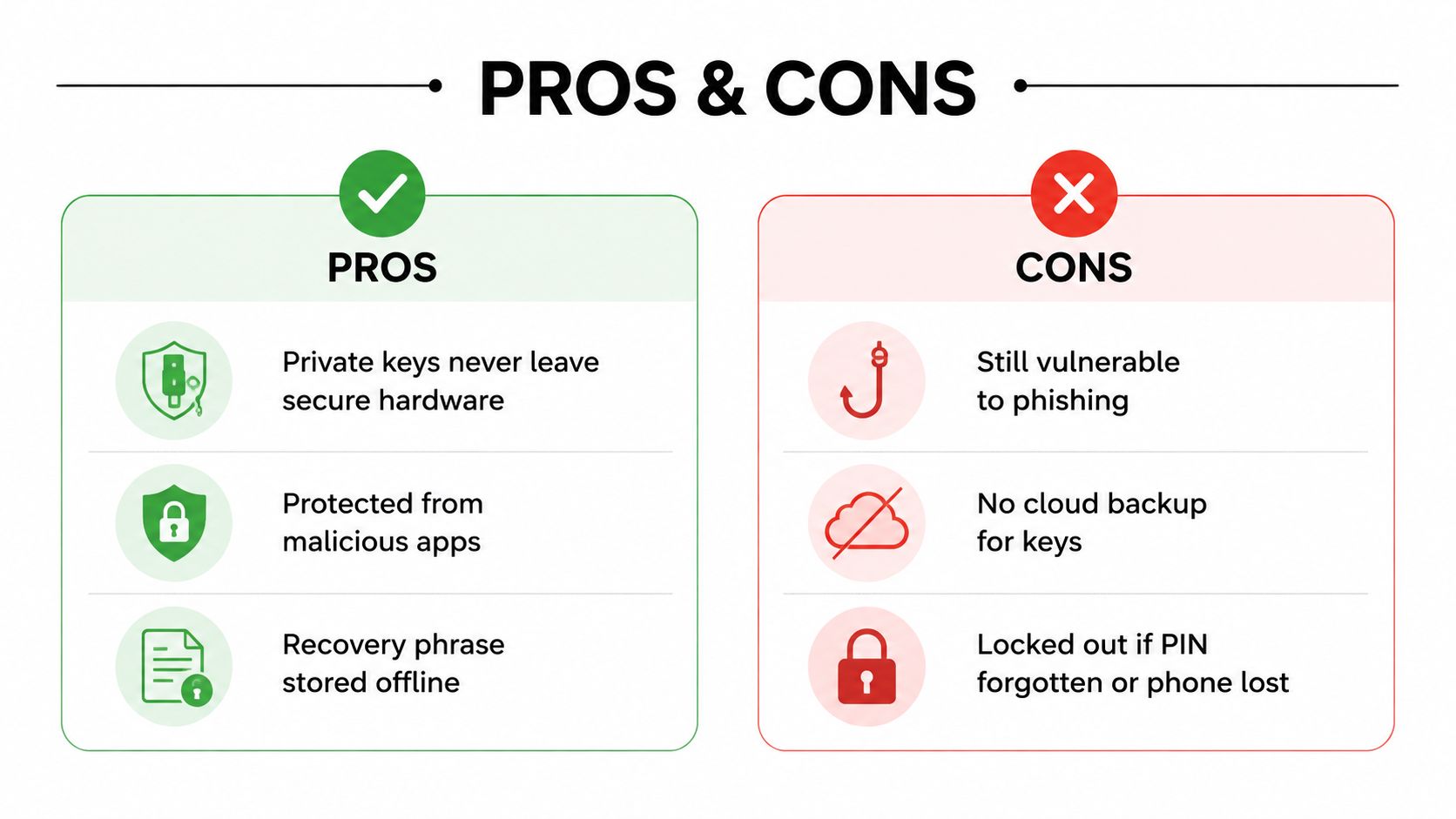
Samsung's design reduces exposure to malicious apps, main-OS compromise, and certain screen-overlay attacks because the key material stays inside the TEE and TUI boundary.Samsung architecture That is a significant advantage. It means ordinary Android malware has a harder time pulling keys out of memory or drawing a fake prompt over the actual one.
The protection stops there, though. Phishing still works if you hand the recovery phrase to a fake site, because the attacker can restore the wallet elsewhere. Physical access is another weak point if someone gets a phone that is accessible, pressures you into entering the PIN, or compromises the device at the hardware level. Samsung also does not promise cloud backup for the keys, so the recovery phrase remains your responsibility to protect.Samsung overview
The practical failures people run into
Forgotten PINs are common, and a lost recovery phrase is worse. If you reset the phone without that phrase, recovery becomes effectively impossible. If the feature is not visible at all, the issue may be regional availability or device support rather than user error.
A few concrete responses help more than vague caution:
- Forgotten PIN: Recheck whether you still have the 12-word recovery phrase before trying anything destructive.
- Lost phrase: Assume the wallet is not recoverable and stop using any suspicious “recovery service.”
- Factory reset: Confirm the phrase is backed up before wiping the phone, because setup has to be repeated.
- Unsupported dApp or network: Verify compatibility first, because the Keystore will not make every Web3 app work automatically.
Samsung's support can change over time, so it is better to rely on current documentation than to assume every device and region behaves the same way forever. The lesson is boring but true. Hardware protection lowers risk, it does not erase it.
Best Practices for Long-Term Key Management
The safest Keystore setup starts with the recovery phrase, not the phone. Write the phrase on paper or stamp it into metal, then store it in a separate physical location from the device. Never type it into a website, an app, or a cloud note, even if the app looks legitimate.
Keep the device side disciplined too
Your phone still needs basic hygiene. Keep the OS and Samsung services updated, use a strong screen lock, and treat the six-digit PIN like a bank PIN rather than a casual access code. If you share your phone with family or coworkers, that matters even more.
For portfolio management, I'd keep Samsung Blockchain Keystore for everyday Web3 use and modest balances, then move long-term or larger holdings to a dedicated hardware wallet. That split keeps the phone convenient without making it carry more risk than it should.
A real-world example makes this easier to remember. If you lose the phone on a trip, the recovery phrase is what saves you, not the handset itself. If the phrase is on paper in a different place, you can rebuild the wallet. If it isn't, you're stuck.
Memorable rule: The recovery phrase is the wallet, the phone is just the window.
A good setup doesn't have to be complicated. It just has to respect the one thing crypto keeps proving over and over, control is only as strong as your recovery plan.
If you want practical crypto guides that stay grounded in how wallets, dApps, Web3 tools, and security work, Coiner Blog covers those topics in plain language. Read more at Coiner Blog for walkthroughs that connect wallet safety to real blockchain use, not hype.