
How to Avoid Phishing Attacks Without Becoming Paranoid
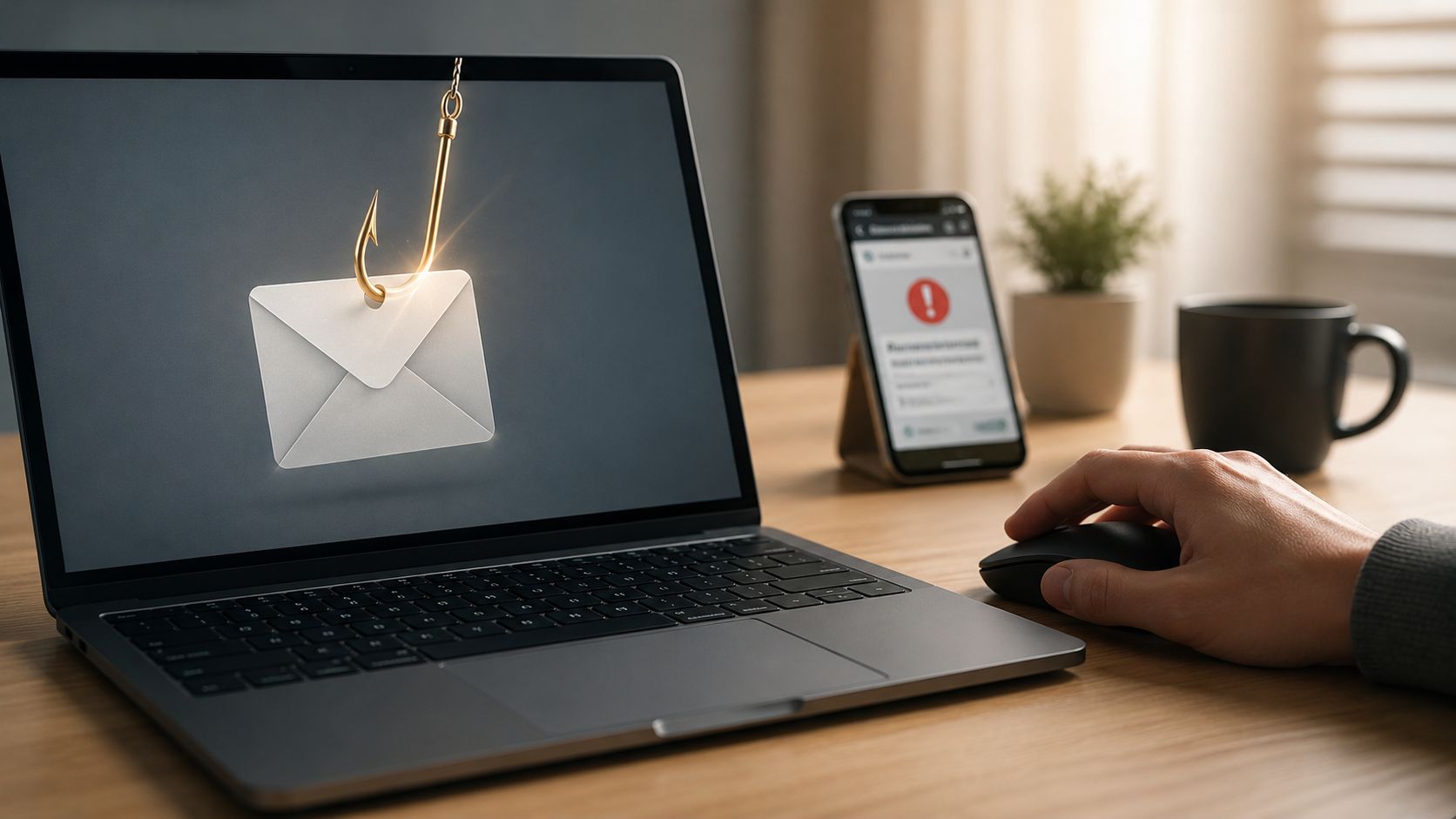
The Anti-Phishing Working Group recorded about 3.8 million phishing attacks in 2025, and that's before you count the endless stream of wallet-drainer pages, fake support DMs, and SMS lures hitting crypto users every day. Phishing isn't a clumsy email problem anymore, it's an industrial scam business that follows people across email, texts, phone calls, social apps, and dApp prompts. The way out isn't paranoia, it's a short list of habits that make attackers waste their time.
Table of Contents
- What Phishing Looks Like in 2026
- Spotting the Red Flags in a Suspicious Message
- How to Verify a Request Without Falling for It
- Phishing Beyond Email, Phone, SMS, and QR Codes
- Crypto-Specific Phishing, Wallets, dApps, and Seed Phrases
- What to Do in the First 30 Minutes After You Click
- Tools, Habits, and Long-Term Defenses
What Phishing Looks Like in 2026
Phishing at today's scale is not a fringe threat. The APWG recorded about 3.8 million phishing attacks in 2025, up from 3.76 million in 2024, and one industry estimate put global phishing email volume at roughly 3.4 billion messages per day Astra's phishing statistics review. That volume explains why even careful people get hit. Attackers don't need to beat everyone, they just need to catch the person who's tired, rushed, or half-paying attention.
In plain English, phishing is any message or page built to make you hand over something valuable, usually a password, a login code, a wallet signature, or a seed phrase. For crypto users, that means more than email. It includes smishing on SMS, vishing over calls, fake support on X and Discord, malicious airdrop pages, QR-code traps, and dApp wallet-drainer sites that look like a normal DeFi interface until the wallet prompt empties you out.
Phishing is an industrial-scale business problem, not a personal failure. The job is to build habits that break the attack chain before the click, the reply, or the signature.
The reason it works is boring, and that's exactly why it keeps working. People see urgency, trust the sender name, or assume a familiar logo means a familiar domain. The fix is also boring, pause, verify through a separate channel, and use multi-factor authentication wherever it's available.
Spotting the Red Flags in a Suspicious Message
Most phishing messages don't fail because the grammar is bad. They fail, or succeed, on small details that people ignore because they're moving too fast. A fake MetaMask alert, an exchange “account review” email, and a bogus airdrop confirmation can all look clean enough to fool someone who only scans the display name.
Check the sender, not the costume
The single biggest mistake is trusting the sender name instead of the domain. A message can display a real brand name and still come from a lookalike address, and that's where people get burned. If the domain is off by even a tiny typo, treat it as hostile.
Common mistake: users trust the sender name, then click before checking the actual address.
Read the message like an attacker would
Look for these red flags, then pair each with a simple action:
- Display-name spoofing: the name says “MetaMask Support” or “Coinbase Security,” but the actual address is off. Action: open the full sender details and inspect the domain.
- Lookalike links: the URL resembles the legitimate site but swaps letters or adds extra words. Action: hover the link, then type the domain yourself in a new tab.
- Reply-to mismatches: the message looks official, but replies go somewhere unrelated. Action: don't reply, contact the company through a known channel.
- Urgency threats: “account locked,” “funds at risk,” “verify now.” Action: stop. Urgency is the scam.
- Unexpected attachments: invoices, PDFs, ZIP files, or “security reports.” Action: don't open them from the message.
- Generic greetings: “Dear user” or “valued customer” in a message that claims to know your account. Action: verify the claim separately.
A real bank-style message usually tells you to log in from a bookmarked site, gives you a non-alarming explanation, and doesn't pressure you to act in minutes. A phishing message does the opposite, it pushes you to click now, sign now, or pay now. That's the tell.
How to Verify a Request Without Falling for It
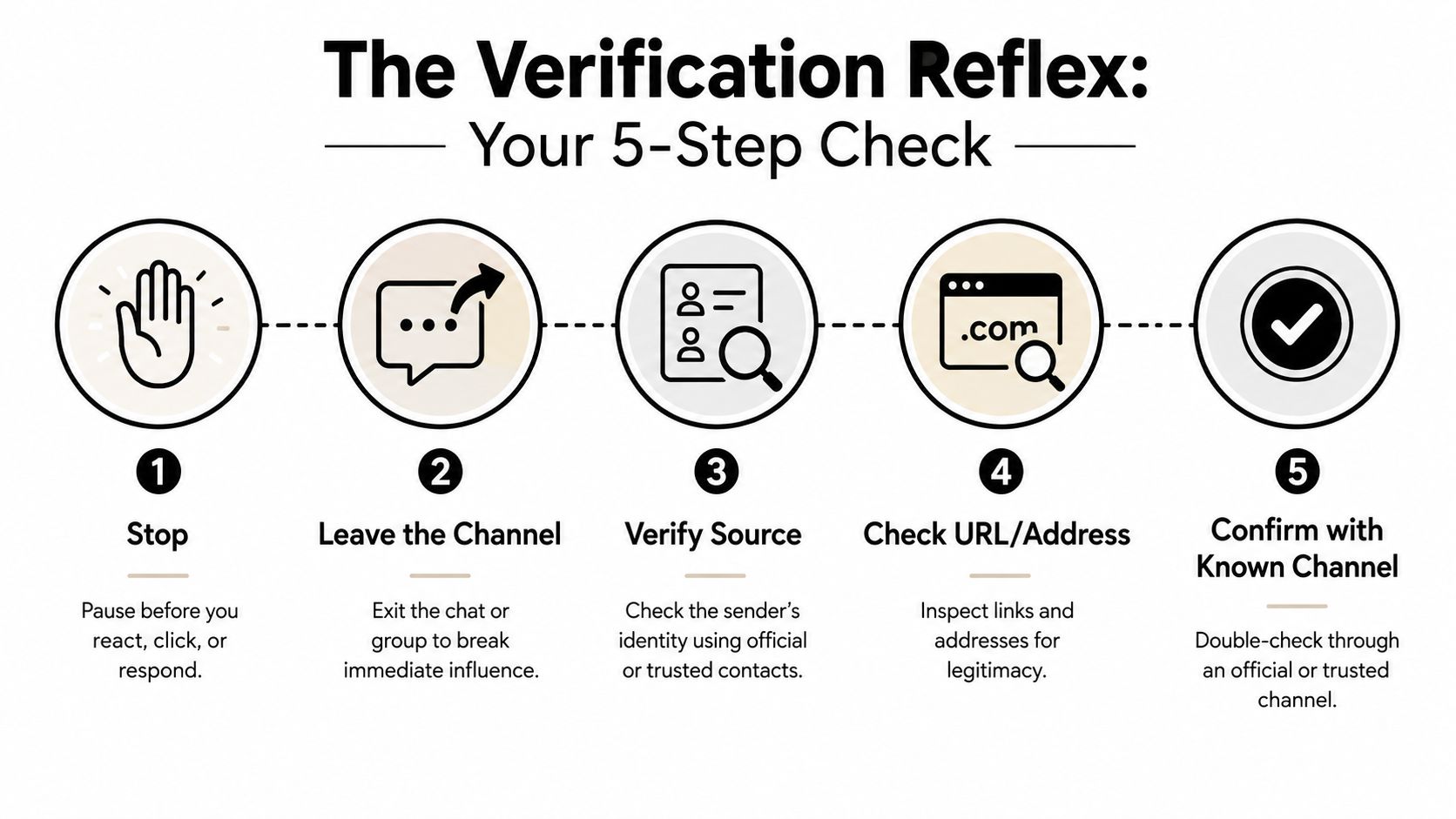
Verification should be a reflex, not a debate. The rule is simple, leave the channel. If a message asks you to click, log in, send funds, or share a code, close it and contact the company through a bookmark, a saved contact, or a number printed on the card you already trust.
Don't let the message define the path
A cloned website can look perfect and still be fake. That's why “it looked exactly right” isn't proof of anything. Visual similarity is cheap, especially with modern phishing kits and copied landing pages.
Use this routine every time:
- Stop and don't interact with the message.
- Leave the channel and open a separate, trusted route.
- Verify the source through a known bookmark or saved contact.
- Check the URL or address yourself, not through a link in the message.
- Confirm with the known channel before taking action.
The FTC and U.S. consumer-protection guidance emphasize independent verification, suspicious-link avoidance, and reporting. The FTC also tells consumers to forward phishing emails to [email protected] and phishing texts to 7726, which gives verification a useful endpoint instead of turning it into dead time OCC phishing prevention guidance.
Treat codes and urgency as traps
If a company claims it “just sent you a code,” that does not prove the request is legitimate. It only proves someone triggered a code delivery. Real support will wait while you verify, scammers won't.
If the sender won't wait ten minutes for you to verify, it wasn't a legitimate sender.
Phishing Beyond Email, Phone, SMS, and QR Codes
Email gets the headlines, but a lot of crypto phishing lands through the channels people trust by habit. Phone calls, SMS, and QR codes work because they feel ordinary. They slip past the part of your brain that expects fraud to look obviously fake.
The channel matters as much as the message
A bank impersonation text can look harmless until it asks you to tap a link and “confirm your account.” A package-delivery smish can hijack your attention with a believable delivery notice. A parking-meter QR code can redirect you to a fake payment page that looks normal on a busy day.
Government guidance explicitly warns against replying to suspicious texts, scanning QR codes from untrusted messages, and treating SMS as a risky channel for authentication. It also recommends using a separate channel to verify requests and avoiding shortcuts like clicking links or loading QR codes from suspicious messages Canadian Centre for Cyber Security guidance.
Use the same rule everywhere
- Phone calls: if someone calls “from support,” don't trust caller ID. Mitigation: hang up and call the published number yourself.
- SMS: treat any login, delivery, or account warning as untrusted until verified. Mitigation: don't reply, don't tap the link, verify through the app or a known site.
- QR codes: assume the code can send you anywhere. Mitigation: inspect the destination before you open it, and if you can't verify it, don't scan.
- MFA prompts: repeated push approvals are often fatigue attacks. Mitigation: deny anything you didn't start.
If you're tightening down mobile crypto workflows, the secure-storage walkthrough at Samsung Blockchain Keystore explained for 2026 is worth a look, especially if you're deciding where your signing keys should live on a phone.
The real lever is killing “trust the default app” shortcuts. If every tap and prompt gets verified, attackers lose the easy path.
Crypto-Specific Phishing, Wallets, dApps, and Seed Phrases
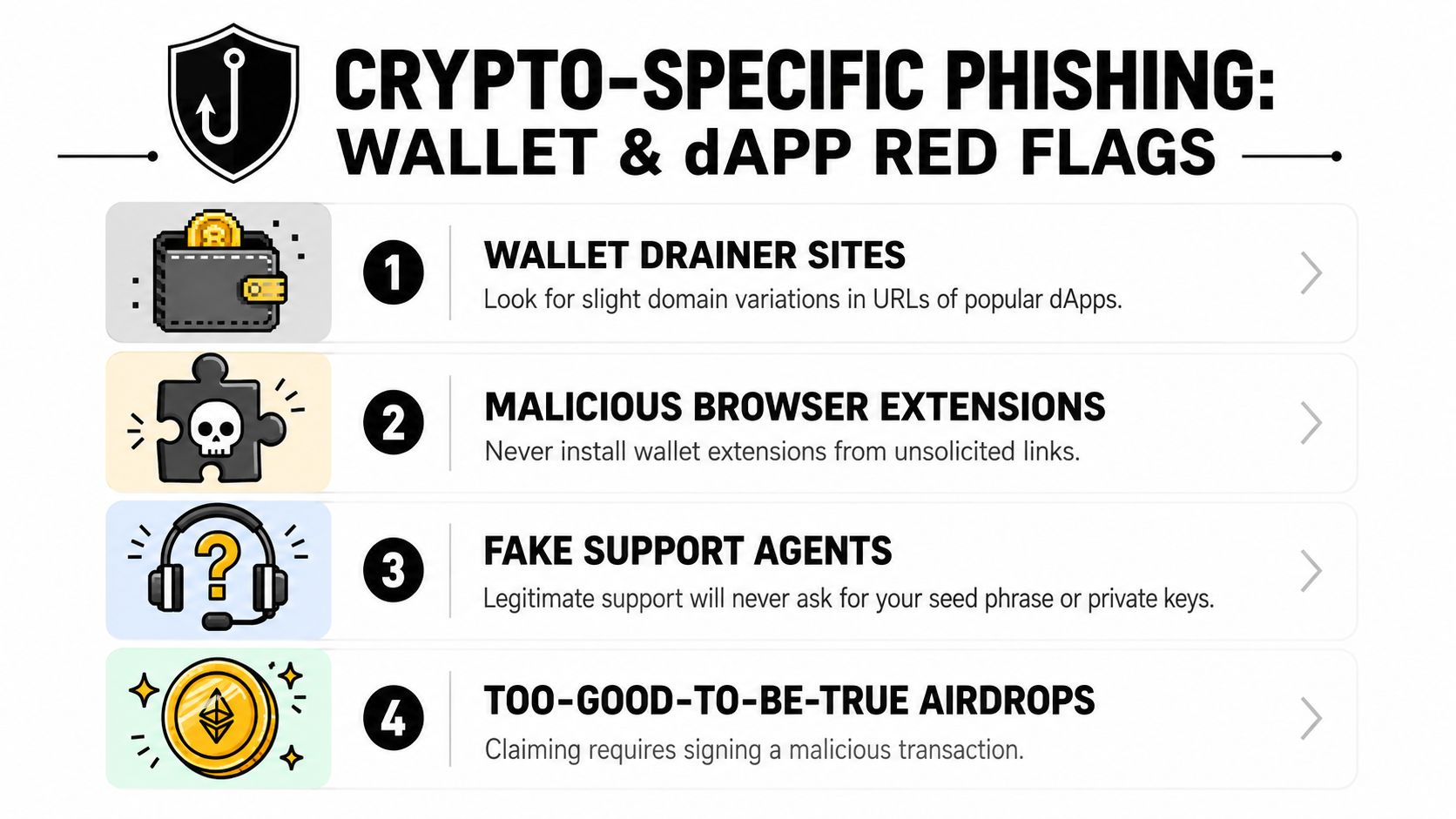
Crypto users get burned by one bad signature, not just one bad click. A wallet drainer does not need your seed phrase if it can push you into approving unlimited token spending. A fake support DM does not need to break into your device if it can talk you into typing a recovery phrase into a form.
Wallet phishing is different from email phishing. The attack usually happens at the exact moment you connect a dApp, sign a message, or approve a contract, so the prompt itself becomes the trap. The fix is simple, read every wallet screen like it can move funds, grant permissions, or hand over control of your account.
Legit dApp prompt vs phishing prompt at the wallet level
| Signal | Legitimate dApp | Phishing dApp |
|---|---|---|
| Domain | You typed it or opened a saved bookmark | Slight spelling change, extra word, or clone domain |
| Wallet prompt | Clear purpose, narrow permission | Broad approval, hidden destination, vague wording |
| Signature request | Tied to an action you initiated | Appears from nowhere or after a lure |
| Support contact | You reached out first | Someone DMs you first |
| Seed phrase request | Never needed | Requested “for recovery,” which is a scam |
Use a burner hot wallet for new dApps, especially on DeFi protocols, NFT mints, and Layer 2 networks you have not used before. Keep serious holdings in a wallet that does not casually connect to random contracts. Then revoke approvals regularly, because old allowances are the quiet way assets get swept later.
For crypto accounts, the strongest rule is not your keys, not your coin. Your seed phrase stays offline. Your private key never gets typed into a site. If a wallet prompt looks vague, broad, or rushed, reject it and walk away.
You do not need a seed phrase. You need to remember that you never need to enter your seed phrase.
What to Do in the First 30 Minutes After You Click
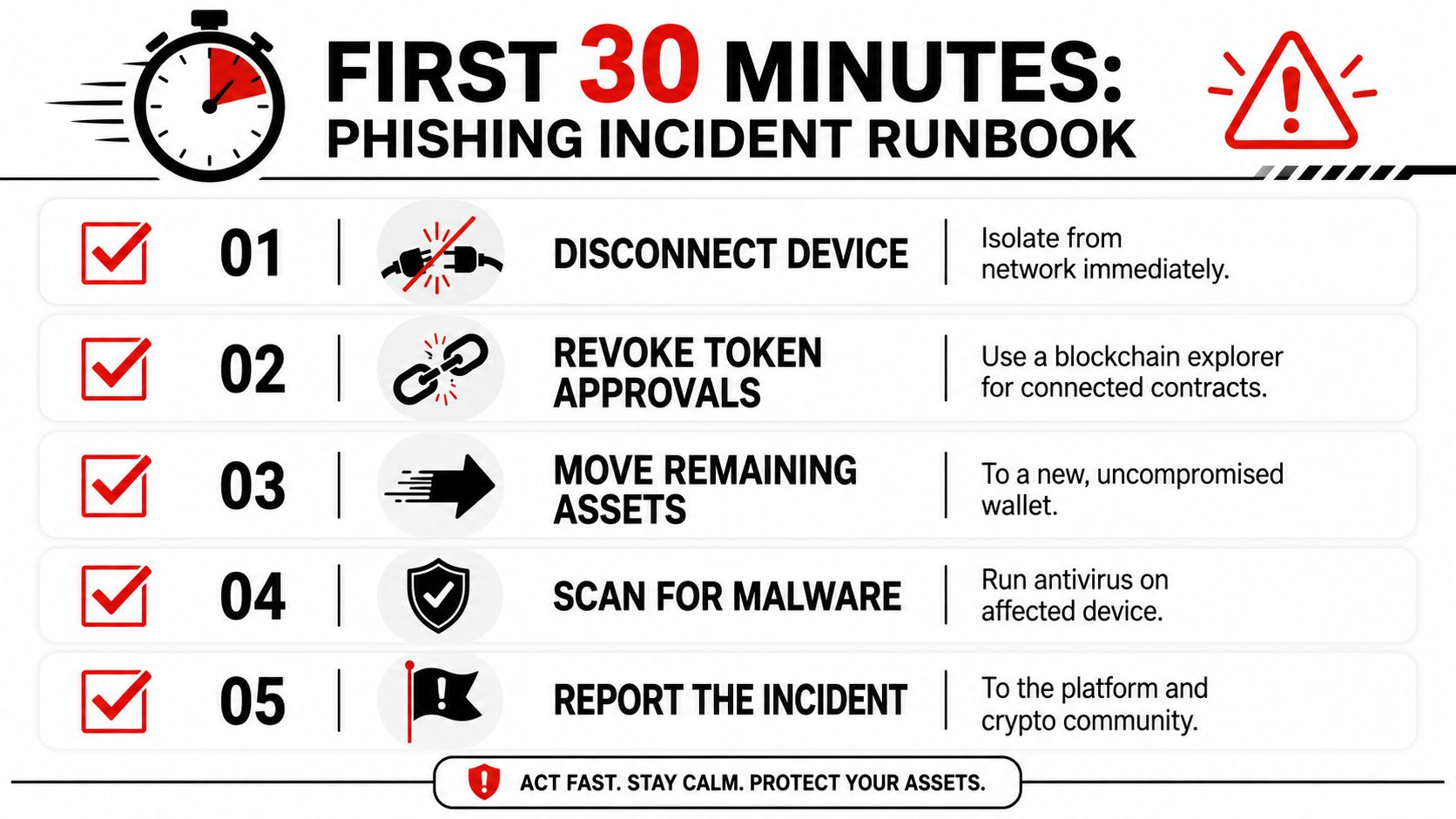
A phishing click is a containment problem first. Stop the bleed, then clean up access, then inspect for persistence, then report what happened. Do not spend those first minutes arguing with yourself about whether it was “probably fine.”
Do the containment work first
If the click may have installed malware or opened a malicious page, disconnect the device from the network right away. Use a known-good device for everything that follows. Change affected passwords starting with email, exchange, and any account that can reset the others. Then kill active sessions so the attacker cannot keep riding an old login.
Check for persistence, not just the password
Phishers love anything that survives a password reset. Mailbox rules, new MFA methods, and OAuth grants can all keep access alive after you think the account is fixed. Review account activity, inspect login history, and remove anything you did not create yourself.
For crypto cleanup, revoke token approvals through a reputable on-chain revoke tool. If the wallet prompt came from a malicious dApp, treat the wallet as exposed until you have checked allowances and sessions. Move remaining assets to a fresh wallet if you think the old one is compromised, and do it from a clean device.
Use the Microsoft phishing protection guidance you already know as a reminder to contact the company through a known phone number or website, then apply that same discipline to incident response. Check for browser sessions, email rules, connected apps, and wallet permissions from a device you trust. If you only changed the password, you stopped halfway.
The password reset is the start, not the finish. Sessions, rules, approvals, and second factors are where attackers stay hidden.
Tools, Habits, and Long-Term Defenses
The best defense is a setup that makes the wrong action annoying. Use a password manager with unique long passwords, turn on MFA or passkeys wherever you can, and prefer hardware-key MFA over SMS codes for high-value accounts. Keep your browser and operating system updating automatically, because old software is where a lot of easy compromises start FTC phishing guidance.
For crypto, I'd keep one wallet for experimentation and another for meaningful holdings. Treat your seed phrase like an offline secret, not something you ever type into a form, a chat, or a support ticket. Check approvals periodically, and don't reuse authentication methods across the accounts that matter most.
Security awareness training works because habits change over time. KnowBe4 research reported a global average Phish-prone Percentage of 33.2% before training, dropping to 20.1% after 90 days and to 4.2% after one year Astra's phishing statistics review. That's the core lesson, people get better when the checks are repeated and specific.
If you want a company-focused playbook alongside personal hygiene, phishing prevention for companies is a useful companion read. For crypto readers, keep how to avoid crypto scams in your bookmarks too, because phishing is usually just the first move in a wider fraud chain.
Pin this checklist: use unique passwords, turn on MFA, prefer passkeys or hardware keys, verify through a separate channel, never enter a seed phrase, revoke approvals, update software automatically, report fast. Also bookmark the FTC's reporting paths, [email protected] for email and 7726 for texts, so the next suspicious message gets reported instead of clicked.
Coiner Blog covers Bitcoin, Ethereum, DeFi, Web3, Layer 2 networks, tokenomics, and the risks that come with real crypto use, not just the hype. If you want more straight-talking guides like this, visit Coiner Blog and keep building a safer routine around the way you use wallets, exchanges, and dApps.